 sales@batterydeji.com
 English




In the feature-phone era, three days on a single charge was normal.
Today, charging more than once a day is routine. Compared with the leaps in processors and displays, battery technology has evolved at a much slower pace.
Apple’s “Battery Health” blends hardware and software to rethink power management, balancing safety, longevity, and user experience.
This article breaks down its technology, design logic, business strategy, and industry impact.
1. Technical Principles
1.1 Lithium-ion degradation
Repeated charge cycles cause electrode wear, electrolyte breakdown,and lithium dendrite growth, reducing capacity and raising resistance.
1.2 Dynamic Voltage Management
Apple’s “gas tank” analogy illustrates its approach: think of the battery as a pressurized tank, with voltage as the pressure and capacity as the gas volume. As the battery ages and chemistry stabilizes less effectively, Apple gradually lowers the maximum charging voltage (e.g., from 4.45 V to 4.2 V), trading a bit of capacity for safety.
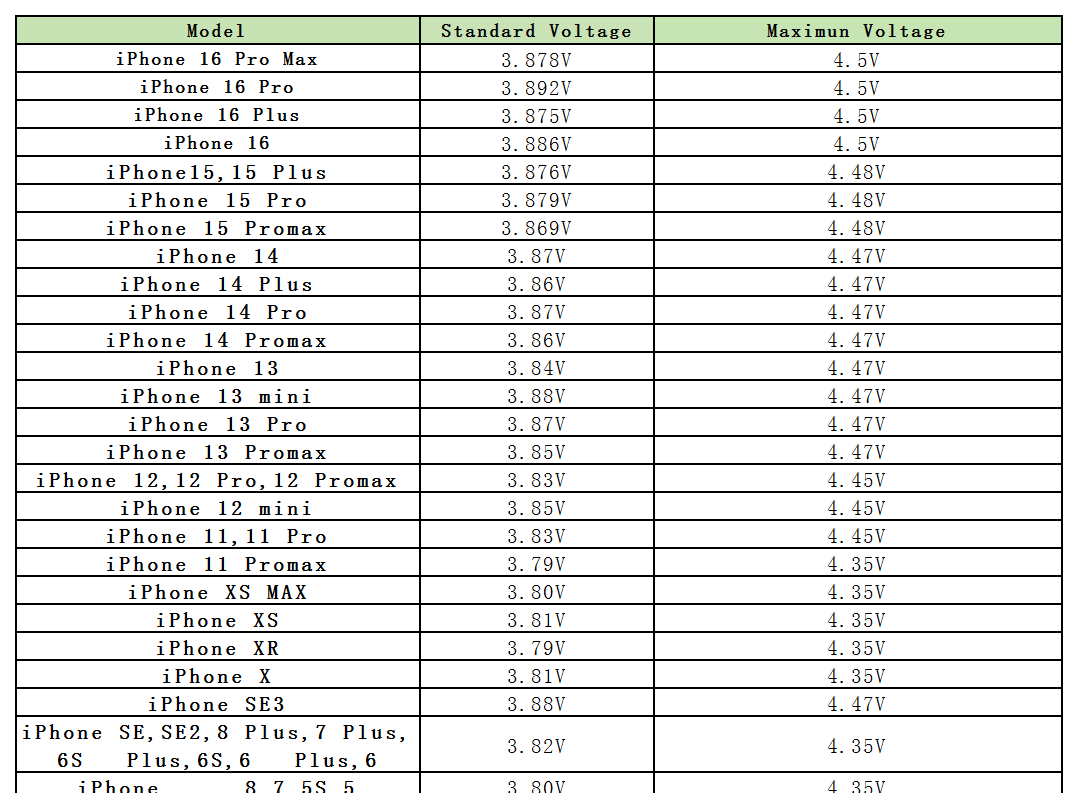
How it’s implemented:
Voltage–capacity curve tuning ~Capacity isn’t linear with voltage; the high-voltage zone offers more capacity but accelerates wear. Apple caps voltage in a more stable range (e.g., below 4.2 V) to slow SEI thickening and dendrite formation.
BMS algorithm updates ~The iPhone’s Battery Management System monitors voltage, current, temperature, and cycle count to adapt charging. For example: over 500 cycles, the cap drops from 4.45 V to 4.35 V; over 1,000 cycles, to 4.2 V.
Encrypted protection ~ Since iPhone 11, Apple encrypts battery health data, allowing only authorized repair centers to reset it, keeping the system closed and preventing unsafe workarounds.
1.3 High-Capacity Cells
Larger batteries offset voltage limits but face space, compatibility, and safety trade-offs.
2. User Experience
2.1 Making Health Visible
The core UX innovation is turning an abstract concept into a simple percentage. In *Settings → Battery → Battery Health*.
Displays maximum capacity (%) and peak performance capability, aiding upgrade decisions and resale value.
2.2 Optimized Charging
This feature learns daily habits to reduce time spent above 80% charge:
1. Rapid-charge to 80%.
2. Hold, then top off to 100% just before expected use (e.g., before waking).
By minimizing high-voltage dwell time, lithium wear slows. Apple says this can extend cycle life by \~20%.
User-friendly touches:
* Works automatically; no manual schedules.
* Charging data stays on-device.
* Available on all Lightning-based iPhones running iOS 13+.
The “Throttle-gate” Episode
In 2017, Apple faced backlash for slowing older iPhones (with <80% battery health) to prevent shutdowns under load. While critics called it “planned obsolescence,” it was technically a safeguard.
Reduces CPU peaks on degraded batteries to prevent shutdowns,with manual override available.
2.2 If my phone's battery health is less than 80%, do I need to replace it?
If it's within the warranty period, don't hesitate to contact Apple Customer Service. Why not get a free replacement?
If it's out of warranty, it depends on your experience. If it's between 70-80%, I personally think it's fine if there are no other issues.
If you notice a significant performance impact but can't bear to replace your phone, then it's best to replace the battery. We recommend using an official battery or a third-party battery like a globally renowned brand like DEJI.
3. Business Logic
3.1 Preserving Value
Battery health is a key resale metric. SellCell data shows an iPhone X at 90%+ health fetches \~15% more than one under 80%.
3.2 Monetizing Service — Repair Networks and Parts Control
Battery health ties into Apple’s repair model:
Official swaps – Expensive (e.g., iPhone 14: $99) but include a 1-year warranty and full system integration.
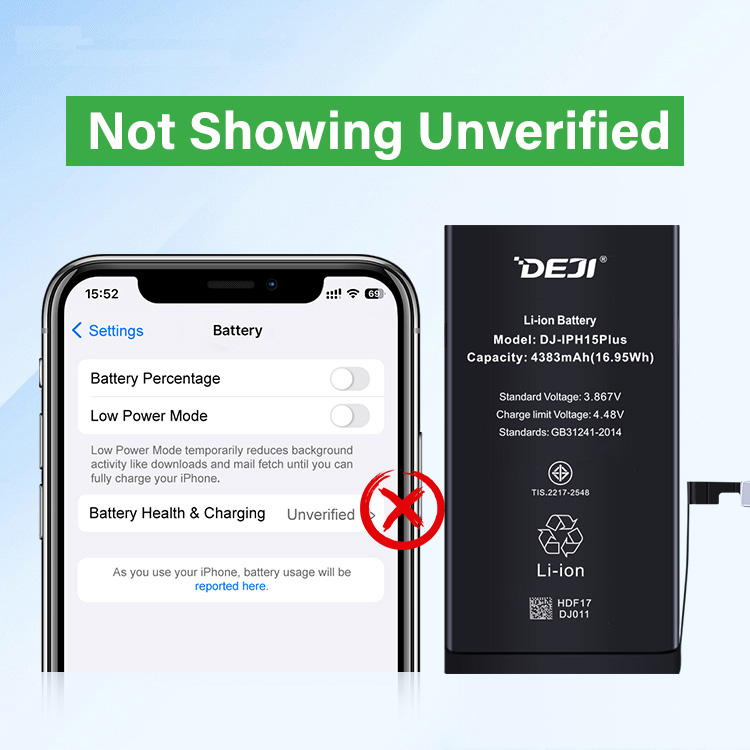
Third-party limits – Non-auth cells may trigger warnings or hide health data. (Learn about DEJI iPhone diagnostics compatible batteries)
Parts certification – The MFi program enforces quality and compatibility.
3.3 Environmental Responsibility
Supports Apple’s carbon neutrality goals through longer device life and
material recycling.
In 2022 alone, Apple recovered 12,000+ tons of e-waste and 25,000 tons of reusable materials.
4. Industry Impact
-
Sets a benchmark for transparent battery health data and dynamic voltage control.
-
Pushes suppliers toward higher-density, longer-life batteries.
-
Shifts users from passive consumers to active device managers.
Apple’s "Battery Health" is as much about user trust and ecosystem control as it isabout chemistry-making the iPhone not just a device you use, but one you manage for the longhaul.
Tired of your phone dying too soon? Upgrade to a DEJI Battery for longer life, stable performance, and 100% health display — fully compatible with the latest iOS.